
Overview of the Evrideo MAM
Whenever in the Scheduler, Autopilot, Live or Playout tabs, the Media Asset Management (MAM) section is always visible for quick and easy file management.
The MAM section is used to collect and organize all of the material necessary for broadcast. This includes: video files, audio files, graphic files and ads.
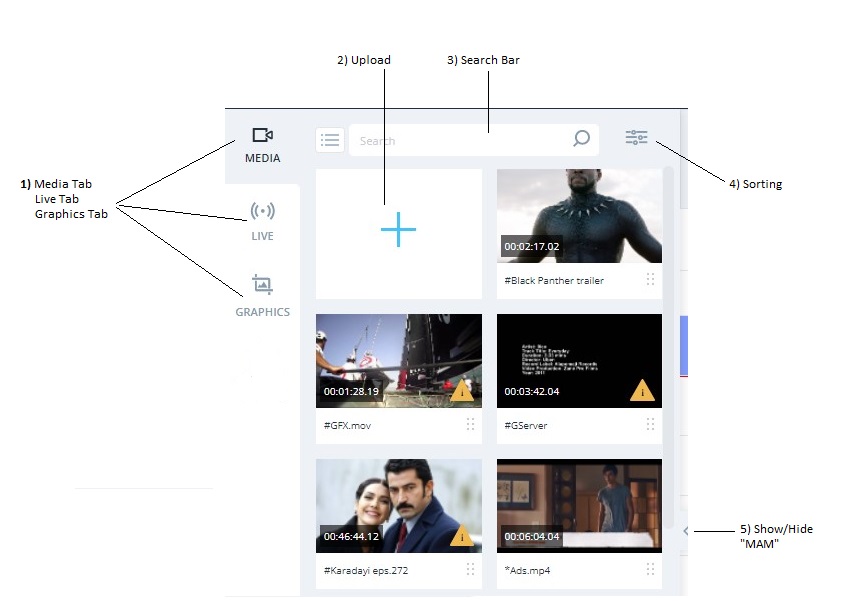
- Media / Graphics / Live Tabs - the MAM contains 4 vertical tabs for quick access between different sections.
- Upload New - click the icon in the Media Tab and choose a Video file from the computer.
- Search Bar - search for files using free text (besides searching the name of the file you want to locate, you can search files also by their ID, Tags, etc.)
- Sorting Options - Sort your files in the Media Tab by clicking the icon
 . You can choose to sort your media files by their Name, Type, Duration or Date Created.
Click the icon to change the direction of the sorted files.
You can also Filter the sorted files according to their Status (All, Uploading or Ready), Tags, Asset Type (All, Ad, Video etc.), Language, Date Created (choose a time-frame),
To clear all fields, click Clear All. - Show / Hide MAM - The MAM is visible by default. If you wish to minimize it, simply click the
 icon. Click
 to return to the default state.